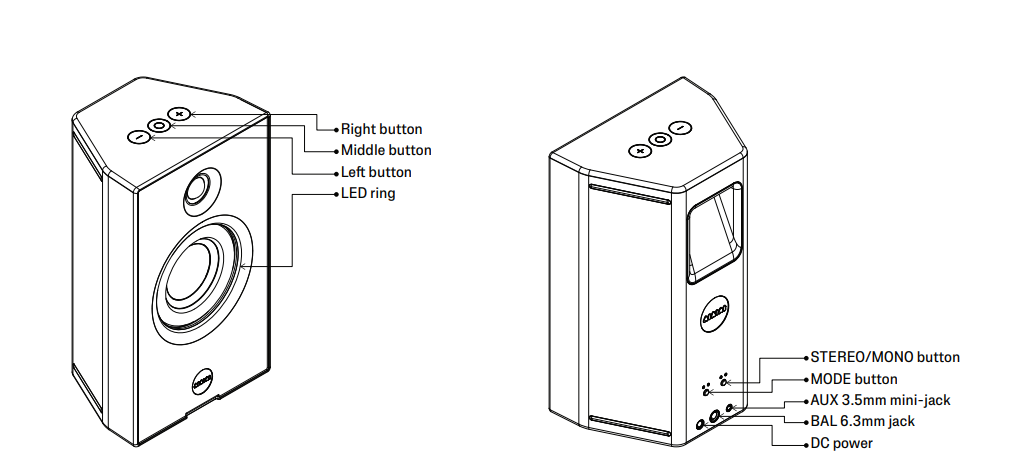
Hold the middle button for 2 seconds to turn UNIT-4 on. The Mode button chooses W+ Link or Bluetooth®. The Stereo/Mono button chooses Left, Right, or Mono.
Key facts
With two UNIT-4, do each step on both.
- Power. Hold the middle button for 2 seconds.
- Mode. Press the Mode button for W+ Link or Bluetooth, or insert an audio cable.
- Bluetooth pairing. Hold the Mode button for 2 seconds.
- W+ Link. Please follow the steps in How do I pair X04 with UNIT-4?. For X02, please follow the steps in How do I pair X02 with UNIT-4?
- Left, right or mono. Press the Stereo/Mono button. The settings are Left, Right, and Mono.
- Volume. Single press the + or − button.
- Mute. Single press the middle button.
- LED ring. Triple press the middle button to turn it off or on. Brightness is in the AIAIAI app.
- EQ. UNIT-4 is studio-flat out of the box. Please follow the steps in How do I adjust the EQ on UNIT-4?
- Battery. Double press the middle button to see the level. Please follow the steps in How do I charge UNIT-4?
- Size. 2540 g. 156 x 258 x 114 mm (W x H x D).
Was this article helpful?
That’s Great!
Thank you for your feedback
Sorry! We couldn't be helpful
Thank you for your feedback
Feedback sent
We appreciate your effort and will try to fix the article