In our AIAIAI App you can set the EQ of your S11's speaker units to your personal liking. To do so, follow the instructions below:
1. Download the AIAIAI AUDIO App.
2. Switch your S11 to Bluetooth mode and connect it to your device.
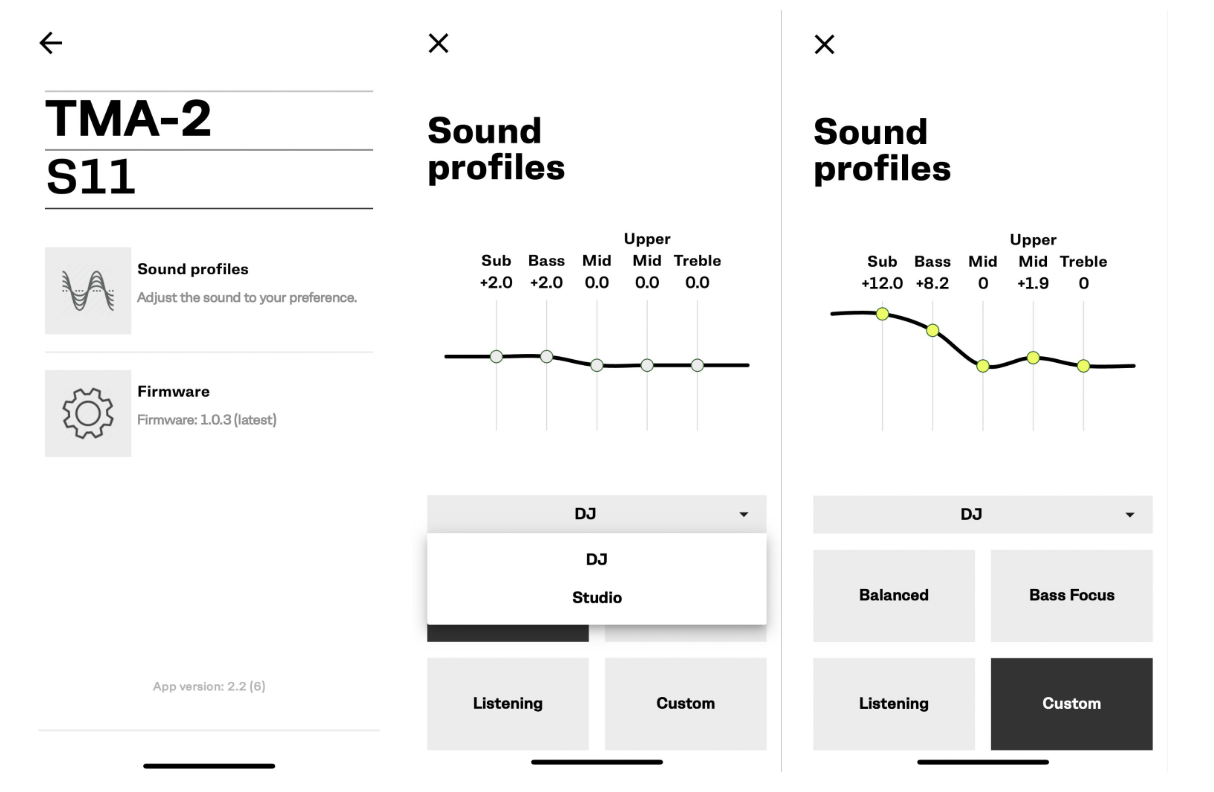
3. Enter the AIAIAI AUDIO App. Chose "Sound profiles"
4. Depending on your listening purpose chose either "Studio" or "DJ" - for general listening you can pick either and play around :)
5. Now it is time to chose your preferred EQ settings! There is 3 predefined EQ settings and one for you to customize from scratch. Enjoy!
App specs
| Feature | AIAIAI App |
| Software type | App |
| Runs on | Android, iOS |
| EQ presets | 12-band |
| Custom EQ | Yes, 5-band |
| When is EQ applied | EQ is saved when you are using W+ and BT mode |
Can I use TMA-2 EQ Machine and the AIAIAI App EQ at the same time?
You should set the app EQ to custom EQ, and all bands to 0, before using your DAW with the EQ Machine plugin applied.
Was this article helpful?
That’s Great!
Thank you for your feedback
Sorry! We couldn't be helpful
Thank you for your feedback
Feedback sent
We appreciate your effort and will try to fix the article